
How to Renew Facebook Marketplace Listings Automatically Every Day
See how to renew Facebook Marketplace listings automatically in Chrome. Compare manual renewal with scheduled relisting and learn how to check each run.
MarketPilot automatically republishes Facebook Marketplace listings in desktop Chrome. Choose one time and the days of the week. On each scheduled day, it removes the old listings for your active products, confirms removal and publishes fresh copies. Keep your linked Chrome profile open and the computer awake.
Manual renewal vs. automatic relisting
When Facebook shows a Renew option, you can use it to refresh an existing listing. Relisting creates a new post. MarketPilot works from the product details you saved in its dashboard.
| Step | Manual renewal | Automatic relisting |
|---|---|---|
| Start | Open Facebook and renew each eligible listing yourself. | Set one time and choose the days of the week. |
| Listing | Refresh the existing post when Facebook offers that option. | Replace the old post with a fresh copy using the saved product details. |
| Check the outcome | Check each listing on Facebook. | See how many were removed and published in the Renewals tab. |
1. Register your products and set the schedule
Use the desktop Chrome profile linked to MarketPilot and signed in to the Facebook account you sell with.
- Install MarketPilot from the Chrome Web Store and connect your Facebook account in the dashboard.
- Under Products, add the photos, title, price and description. Mark the products you want to relist as active.
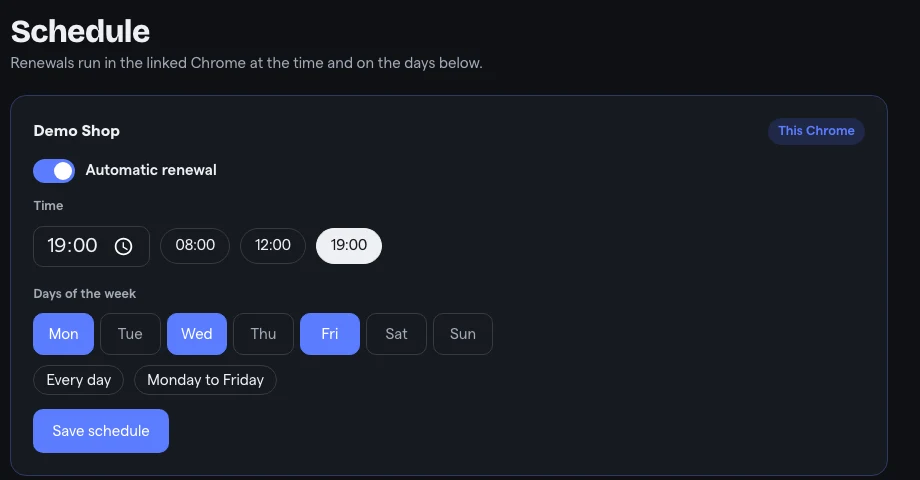
- Open Schedule, turn on automatic renewal, select the days and one time, then save. Leave Chrome open and the computer awake at that time.
2. Check what went live
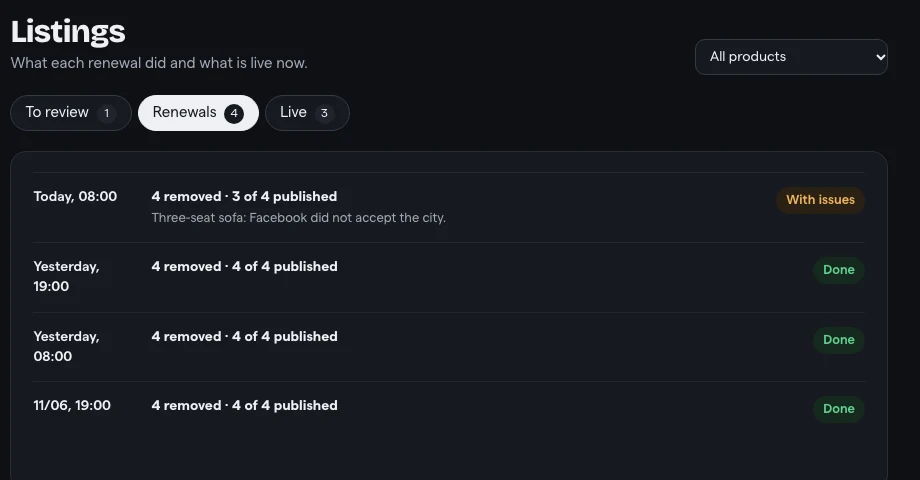
Open Listings → Renewals. Each run shows how many listings were removed and published, plus any failures reported. If a run is incomplete, review the reason before trying again.
Frequently Asked Questions
How often should I renew Facebook Marketplace listings?
Many sellers renew once or twice a day, at the hours their buyers are most active. MarketPilot lets you choose one time and the days of the week.
Does renewing delete my old listing?
With MarketPilot, yes: it deletes the old listing, confirms it is gone and then publishes a new one, so you do not end up with duplicates.
Does it work if my computer is off?
No. MarketPilot runs in your Chrome, so the computer must be on and awake, with Chrome open, at the scheduled times.
Ready to manage Marketplace listings faster?
Install MarketPilot, register your products once and let it relist your Facebook Marketplace listings on your schedule. Free for up to 4 listings live at a time.